ROLE : UX RESEARCHER | UI/UX DESIGNER
TIMELINE : 3 MONTHS (2025-26)
Wheel of
Wellness
(WoW)
HEALTHCARE WORKFLOW DESIGN
Transforming fragmented women's wellness camp workflows into a connected, flexible digital healthcare experience.

Project Overview
Wheel of Wellness is a healthcare workflow design project that transforms paper-based women's wellness camps into a distributed, flexible healthcare workflow system. Grounded in field research, it improves coordination, reduces repetitive documentation, and streamlines patient care across multiple healthcare workers.

About the
WoW Program
Wheel of Wellness (WoW) is a preventive healthcare initiative
designed for women above 30 years of age. The program is
conducted through wellness camps in collaboration with hospitals and healthcare organizations.
The camps include:
• Registration & intake
• General wellness screening
• Vitals measurement
• Breast & cervical cancer awareness
• Doctor consultation & follow-up
recommendations


Initial Understanding of the Problem
The initial goal was to digitize the existing paper-based workflow used during WoW camps.
The team aimed to:
• Reduce repetitive paperwork
• Digitize patient records
• Reduce post-camp manual digitization
• Improve operational efficiency
• Create a simple mobile-first workflow
At this stage, the challenge was understood primarily as a form digitization problem.
Early MVP
Brief & Assumptions
BRIEF:
01
To digitise the form filling process that takes place at every WoW camp.
02
The MVP focused on creating a simple
mobile workflow for healthcare workers
to digitally collect, manage, and access
patient wellness records during camps,
without introducing a login system in
the initial stage.
ASSUMPTIONS:
01
One healthcare worker fills the form end-to-end
02
Workflow is linear and sequential
03
Camp structure remains consistent
04
Mobile phones are the primary device
05
Healthcare workers have medium/high digital literacy
06
One patient record is completed in a single continuous flow
MVP Screens
HOME SCREEN :

User clicks on “Select
your organisation”
Homescreen
“Select your organisation” is placed
on the home screen to reduce user
effort , they select it once instead of
for every form.

Select your organisation
User selects their organisation
from the dropdown

Select your organisation alert
If the user clicks on “fill a patient form” before selecting the organisation, an alert pops up, directing the user.
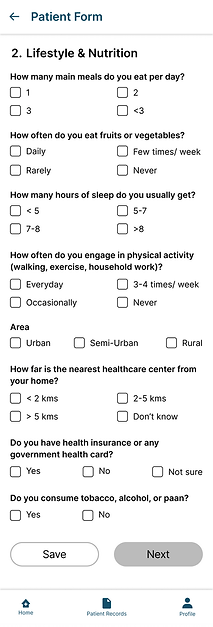
PATIENT FORM - 1 :



PATIENT FORM - 2 :


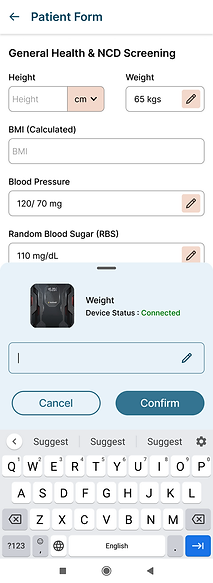
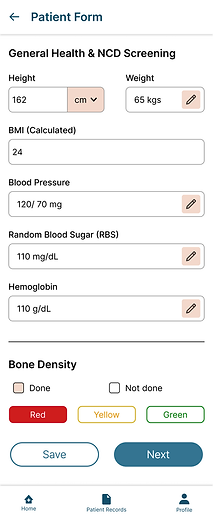
The BP, Weight, RBS, HB parameters are auto-filled with the connected devices
The “Save” and “Next” buttons are now enabled once the entire page has been filled
If the user wants to add the entry manually, or check details about the device, they can click on the pen icon.
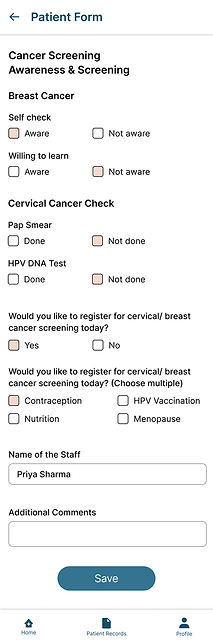
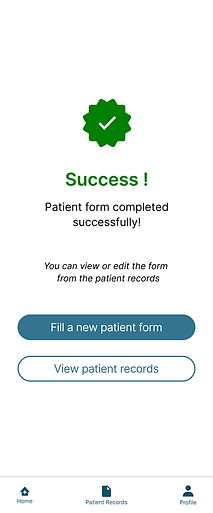
PATIENT FORM - 3 :

Field Visits Changed our Understanding
To challenge and validate assumptions, multiple field visits
were conducted across urban and rural wellness camps.
The objective was to:
• Observe the real end-to-end workflow
• Understand the personas and camp environment
• Map touchpoints and dependencies
• Study paperwork and handoffs
• Identify bottlenecks and
workflow variations
The field research revealed that the real problem was
much larger than form digitization.

Field Visit Observations
Camp Visit - 1 (Bengaluru)

Camp Visit - 2 (Bengaluru)

Camp Visit - 3 (Vijayapura)

Camp Visit - 4 (Bengaluru)

Understanding the
Actual Workflow
The actual workflow was highly distributed and
operationally dynamic.
Instead of a single healthcare worker filling the form :
• Different workers handled different stations
• Data was collected across multiple touchpoints
• Multiple forms/registers existed simultaneously
• Patient movement relied on coordination
• Camp structures varied significantly

Field visits revealed that the real workflow was distributed, operationally dynamic, and highly dependent on coordination
What the
Research Revealed
Research across multiple wellness camps revealed recurring operational patterns and user needs.
THEME 1 : Distributed Workflow
• Multiple healthcare workers contribute
to one patient journey
• Data collection happens across different stations
• Patient movement relies heavily on coordination
THEME 2 : Operational Variability
• Camp structures differ across hospitals and locations
• Stations may merge, split, or change sequence
• Staff roles and operational responsibilities vary across camps
THEME 3 : Fragmented Data & Coordination
• Repetitive documentation exists across stations
• Multiple forms and registers are maintained simultaneously
• Manual handoffs create information gaps and delays
THEME 4 : Technology & Infrastructure Constraints
• Internet connectivity is inconsistent in some locations
• Device availability and usage vary across camps
• Digital literacy levels differ significantly among healthcare workers
The challenge was not simply digitizing forms — it was supporting distributed healthcare workflows.
Reframing the
Problem Statement
Initial Problem Statement
How might we digitize patient form filling during wellness camps?
Reframed Problem Statement
How might we design a flexible and low-friction workflow system that supports distributed healthcare operations across varying camp environments while reducing repetitive documentation and coordination gaps?
The project evolved from digitizing forms to supporting real healthcare workflows during camps.
The Solution
• The solution was redesigned to support distributed
workflows where multiple healthcare workers across
different stations could continue and update the same
patient record.
• A shared camp-based registration system allowed
records to remain synced and accessible across devices
used within the same camp.
• Mobile interaction was prioritized to support portability,
faster workflows, and operational flexibility during
camps.

Low-Fidelity Screens
To Test the Solution
As an early-stage product, the focus was first on making sure the workflow worked.
These low-fidelity screens were created to test and refine the solution before investing time in the final UI.

Testing Insights
What worked well
• Status indicators improved workflow visibility
• Shared records reduced dependency on one device
• WhatsApp sharing simplified report distribution
• Average patient form completion reduced to ~5 minutes, from 8 minutes earlier
Areas for Improvement
• Better section-level completion visibility needed
• Save states should feel more explicit
• Information grouping can be improved further
Next Steps
Based on workflow observations and initial camp usage, several opportunities were
identified to further improve workflow continuity, visibility, and operational flexibility.
• Improve the overall UI and visual hierarchy to make the workflow more intuitive, scannable, and easier to navigate during fast-paced camp environments.
• Reduce and simplify form sections to improve completion speed and reduce cognitive load during camps.
• Introduce stage-based filtering and workflow visibility to help healthcare workers quickly identify incomplete or pending records.
• Explore adaptive workflows for different patient groups such as age-specific and pregnancy-specific care journeys.
• Support printable reports for rural environments where digital sharing and smartphone access may be limited.